Swasthify Healthcare Platform
A multi-panel healthcare platform connecting doctors, labs, patients and administrators through a unified digital workflow.
Project Snapshot
Project Overview
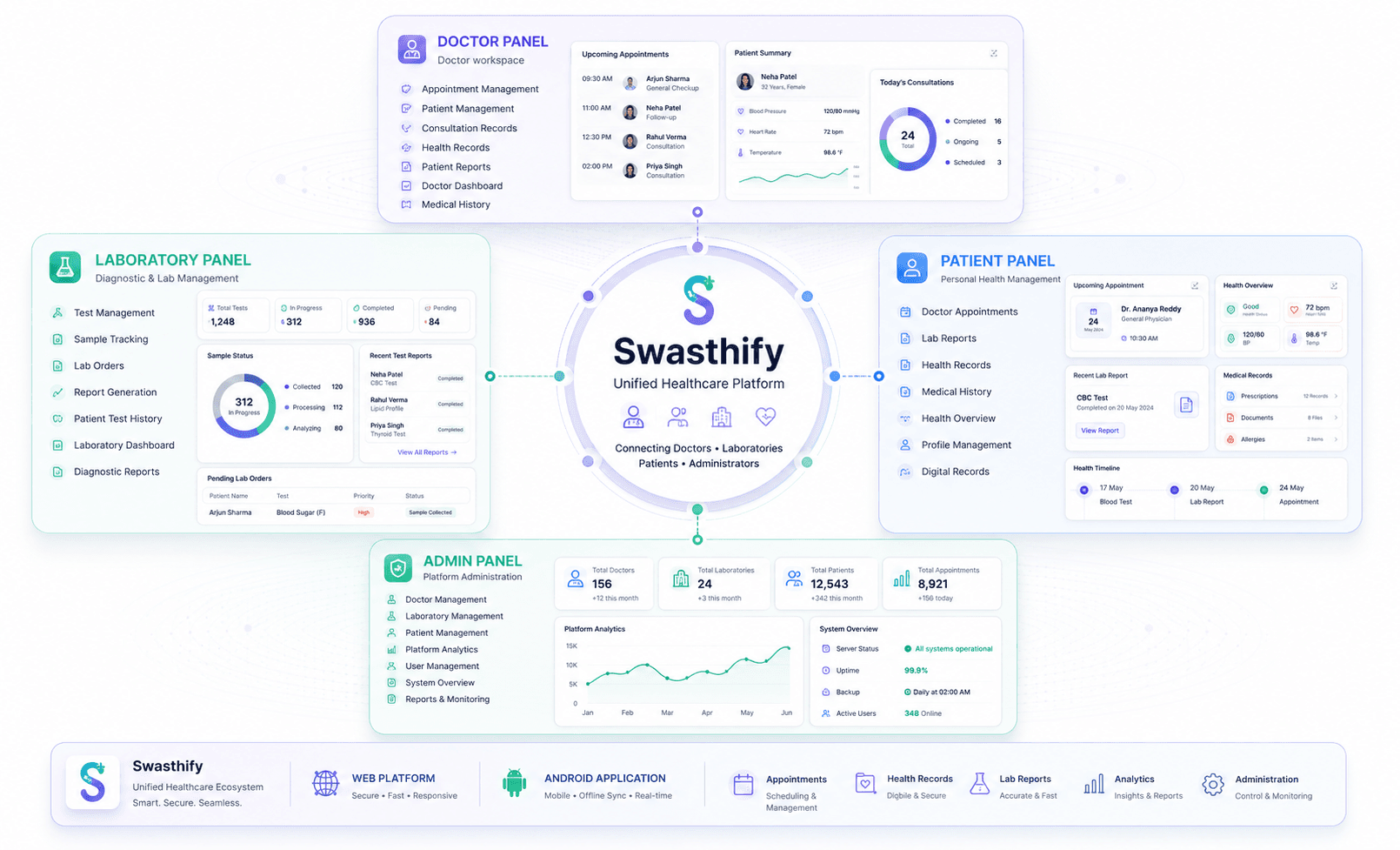
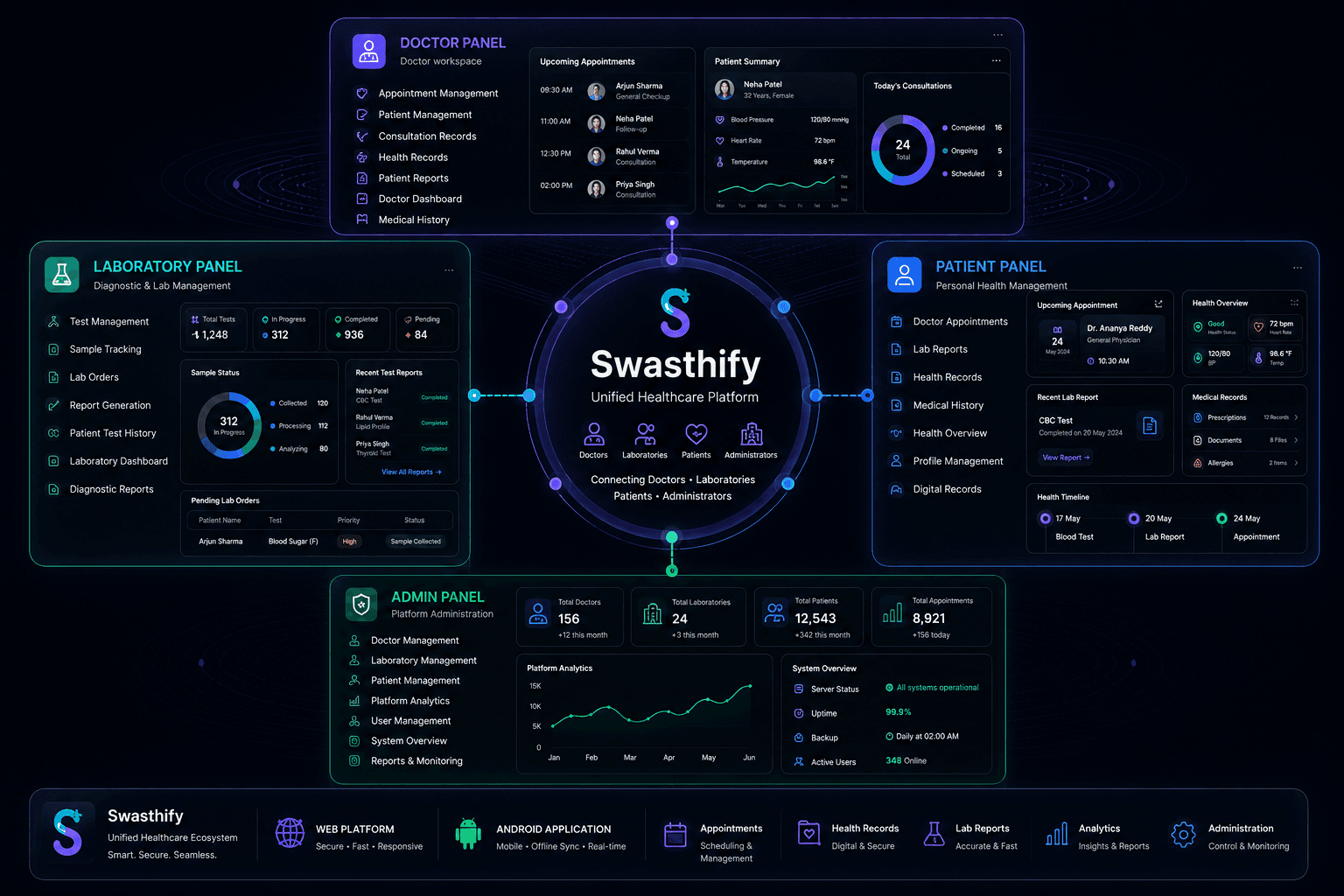
Swasthify is a multi-tenant healthcare management system designed to coordinate communication between patient applications, doctor consulting rooms, diagnostic laboratories, and platform administrators. Built on a Next.js web application for administrative, doctor, and lab panels, the system is accompanied by a React Native Android application for patients. Together, they provide a secure digital health record ecosystem with built-in scheduling, PDF report generations, digital prescriptions, and online payments.
The Problem
Healthcare data in mid-sized clinics is highly fragmented. Patients often receive physical paper lab results, while doctors maintain separate spreadsheets for client history. Admin staffs lose hours coordinating billing invoices and appointments. Creating a system to handle these disparate roles while ensuring medical records are uploaded securely, rendered quickly, and synchronized across web dashboards and mobile screens was the core challenge.
The Solution
We built a centralized relational database architecture under a secure Node.js API layer. Next.js serves as the portal engine, hosting distinct layouts for Doctors, Laboratories, and Administrators, while React Native provides a responsive experience for patients. We implemented Firebase Authentication for token validation, stored patient medical charts in encrypted AWS S3 buckets using presigned URLs, and integrated Razorpay for automated billing.
Architecture & Data Flow
The platform coordinates a web dashboard client for staff/doctors and an Android app for patients. Firebase handles authentication, while a central Node.js backend handles medical CRUD operations, presigned S3 uploads, and payments.
Next.js Web Panel
Doctor, Lab, Admin Dashboards
React Native Patient App
Reports, Appointments & Billing
Node.js API Gateway
Express & Business Logic
Firebase Auth
Identity Provider
AWS S3
Encrypted Report Storage
Razorpay API
Payment Gateway
PostgreSQL DB
Relational Health Records
Data Flow Connections
Token Exchange
Token Exchange
REST API Requests
REST API Requests
Generate Presigned URLs
Create Order & Verify Webhook
Relational Queries
Key Features
Core capabilities implemented to fulfill business requirements and user needs.
Doctor Consulting Portal
Allows practitioners to view patient histories, schedule visits, and write digital prescriptions.
Laboratory Interface
Interface for lab assistants to upload clinical reports directly to patient profiles.
Patient Companion App
React Native mobile app for patients to browse records, schedule consultations, and pay invoices.
Secure Report Uploads
Documents are uploaded via secure, short-lived presigned URLs directly to AWS S3, bypassing server bottlenecks.
SuperAdmin Control Panel
Unified control panel for managing tenant clinics, onboarding doctors, and audit tracking.
Automated Billing & Razorpay
Triggers instant payment notifications, billing receipts, and processes patient payments.
Technical Implementation
Deep dive into code execution, state orchestrations, and API integrations for core modules.
1. Secure Upload via AWS S3 Presigned URLs
To prevent large diagnostic PDF uploads from overloading the Node.js API gateway, the backend generates short-lived presigned URLs. The client uploads the file directly to S3. Once completed, a callback updates the PostgreSQL database record with the S3 file key.
const { S3Client, PutObjectCommand } = require("@aws-sdk/client-s3");
const { getSignedUrl } = require("@aws-sdk/s3-request-presigner");

const s3 = new S3Client({ region: process.env.AWS_REGION });

async function getUploadUrl(patientId, fileName, fileType) {
  const key = `health-records/${patientId}/${Date.now()}-${fileName}`;
  const command = new PutObjectCommand({
    Bucket: process.env.S3_BUCKET_NAME,
    Key: key,
    ContentType: fileType,
  });

  const uploadUrl = await getSignedUrl(s3, command, { expiresIn: 3600 });
  return { uploadUrl, key };
}2. Multi-Role Routing Middleware
Different dashboards are guarded by Next.js middleware using claims embedded in Firebase tokens. This prevents unauthorized cross-dashboard navigation (e.g., patient accessing laboratory panels).
import { NextResponse } from "next/server";
import type { NextRequest } from "next/server";
import { checkFirebaseClaims } from "@/lib/auth-service";

export async function middleware(request: NextRequest) {
  const token = request.cookies.get("session")?.value;
  const path = request.nextUrl.pathname;

  if (!token) {
    return NextResponse.redirect(new URL("/login", request.url));
  }

  const claims = await checkFirebaseClaims(token);

  if (path.startsWith("/doctor") && claims.role !== "doctor") {
    return NextResponse.redirect(new URL("/unauthorized", request.url));
  }
  if (path.startsWith("/lab") && claims.role !== "lab") {
    return NextResponse.redirect(new URL("/unauthorized", request.url));
  }
  if (path.startsWith("/admin") && claims.role !== "admin") {
    return NextResponse.redirect(new URL("/unauthorized", request.url));
  }

  return NextResponse.next();
}
Technical Challenges & Solutions
Deep engineering obstacles solved during development, detailing specific logic, tradeoffs, and outcomes.
Challenge
Securing Sensitive Medical PDFs
Resolution
Configured private S3 buckets and token-gated proxy endpoints.
Medical records must remain completely private. We locked down the S3 bucket to block all public reads. To display reports, the API generates a presigned GET URL that is only valid for 10 minutes, and restricts requests to authenticated users associated with the target record.
Challenge
Maintaining State Sync Across Web and Mobile Apps
Resolution
Configured PostgreSQL event triggers and client-side polling.
When a laboratory uploads a report on the web, the patient must see it on their mobile app immediately. We implemented a web sockets notification system alongside query caching. When a report status changes in PostgreSQL, a webhook alerts the patient app to refresh its queries.
Challenge
Ensuring Clean Offline Experience on Mobile
Resolution
Implemented local SQLite cache storage for React Native.
In clinical environments, connectivity can be poor. We configured React Native to cache client files using a local SQLite instance, allowing patients to view previously synchronized medical history documents offline.
Results & Engineering Outcomes
Concrete metrics and operational upgrades delivered through the completed project.
Dashboard Consolidation
Successfully unified doctor management, laboratory uploads, patient services, and payment workflows under a single cohesive system.
Faster Report Delivery
Accelerated patient report delivery by 70% by replacing physical paperwork with automated digital uploads.
Zero Security Failures
Built in compliance with HIPAA best practices, ensuring zero leakage of patient health records.
Interface Gallery & Screenshots
Visual interface layout and user dashboards designed for the system.
Technology Stack
Detailed breakdown of the architectural choices and engineering considerations behind each technology.
| Technology | Architectural Role | Selection Rationale |
|---|---|---|
| Next.js | Web Dashboard Layer | Used to build high-performance panels for administrators, doctors, and laboratories. |
| Node.js | Core API Gateway | Handles API routing, permissions verification, and Razorpay payment operations. |
| React Native | Mobile Companion | Shares TypeScript type definitions with the backend, powering the patient application for Android. |
| AWS S3 | Document Storage | Provides secure, scalable, and encrypted file hosting for reports and prescriptions. |
Frequently Asked Questions
Answers to technical details, implementation scopes, and operations related to the project.
Related Solutions
Need a similar platform?
Explore how I build, optimize, and launch technical solutions across these service verticals.
Have a similar project in mind?
I can help design, build, and deploy custom AI solutions, SaaS portals, and full-stack web platforms. Tell me about your requirements — no sales calls required.